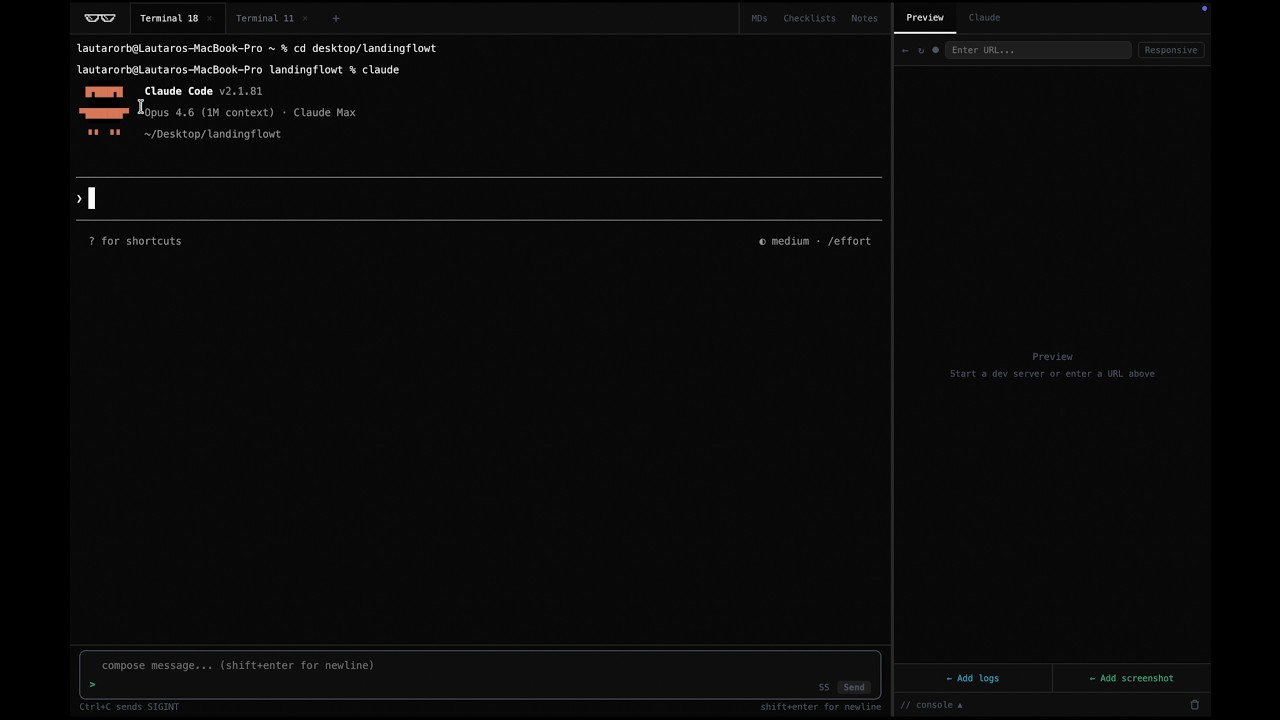
Designed for vibe coding. Claude Code does the thinking and flowt handles the rest. Your whole workflow in one window.
Vibe coding with claude code means constantly switching between your terminal, a browser, and your dev tools. Every alt-tab is a context switch. Every copy-paste is friction.
Terminal → browser → terminal → browser → Finder → terminal. You're spending half your time navigating windows instead of actually building.
Something broke in the browser. Now you need to open DevTools, find the error, copy it, switch to terminal, paste it. By the time you're done, you've lost your flow.
You want to show Claude what the page looks like. So you screenshot it, find it in Finder, drag it to the terminal, hope the path is right. Every. Single. Time.
Terminal on the left, live preview on the right. Everything in one window. Embedded Chromium browser where you can test while you build in the same window.
One click captures the current preview state and drops it as an image into your message. Preview and draw on top of it. Sent directly into the terminal.
One click sends your current browser logs to the input bar as an attached text block. You choose log type and record count.
Rich text field for composing messages. Supports Shift+Enter for newlines, arrow up for history, and image attachments.
128 device presets across 12 categories: iPhone, iPad, Samsung, Pixel, and more. Native resolution, scaled to fit.
Multiple independent shell sessions, each with a custom label. Double-click to rename, drag to reorder, Cmd+1-9 to jump.
Click a screenshot thumbnail to draw on it before sending. Five colors, freehand drawing, composited onto the original.
Auto-detects your project directory and lists all .md files. Expandable with rendered markdown, updates in real time.
A persistent scratchpad with syntax-highlighted keywords: todo, questions, api keys. Supports bold, headings, and lists.
Multiple named checklists with tabs. Add items, check them off, clear done. Persists across sessions.
The right panel has a second tab that embeds claude.ai directly. Reference Claude's web interface without leaving the app.
Captures console output, network requests, JS errors, and failed fetches in real time via Chrome DevTools Protocol. Filterable by type.
Flowt adds no intelligence, makes no API calls, and has no opinion about your code. It is purely a better-shaped window for the way a vibe coding session actually runs.
If you closed Flowt and opened any other terminal app, Claude Code would behave identically. This one just removes the friction from everything around it.
Free and open source. Built for mac. Designed for claude code.